// 11 August 2026 · by James Willcocks
The half of a website nobody asks for
Clients ask how a site looks, and then how fast it loads. Nobody has ever asked me about their heading structure. But the invisible half (structured data, headings, Open Graph, alt text, a cookie banner that's actually legal) is where most websites quietly fall down, and it's precisely the half an AI website builder won't think to give you.
- · seo
- · accessibility
- · business
- · wordpress
Every website conversation I’ve ever had starts in the same place: how it looks. That’s fair enough. It’s the part you can see, and it’s the part your customers see too.
If a client has a second question, it’s usually speed. That one I’ve already written about twice, so I’ll leave it there: why a slow site costs you customers on a bad connection, and why I build on Astro.
What has never once happened, in seven years, is a client ringing me up to ask whether their heading structure is right. Or whether their pages carry structured data. Or what their homepage looks like when somebody pastes the link into a Facebook group.
That’s the other half of a website. It’s invisible, it takes real time, and the client can’t tell whether you did it, which is exactly why, on an awful lot of sites, nobody did.
It’s tempting to file all of it under SEO, and a good deal of it does show up there: structured data, heading hierarchy, unique page descriptions and real local pages are what let a search engine understand you rather than guess at you. But SEO is only the part with a name. The rest of it decides whether your link looks credible when a neighbour recommends you in a village Facebook group, whether somebody using a keyboard or a screen reader can actually get through your site, and whether your cookie banner is on the right side of the law. Same work, four different reasons, and only one of them is the one people ask about.
Here’s what’s in that half.
Structured data, or: the label on the tin
Your website is written for people. A search engine or an AI assistant arriving at it has to infer everything: that this is a business, that the 11 digits in the footer are a phone number, that “Ivybridge” is where you work rather than somewhere you once mentioned.
Structured data stops the guessing. It’s a small block of machine-readable information embedded in the page, invisible to visitors, written in a vocabulary every major search engine agreed to support. Instead of hoping Google works it out, you state it.
Say you’re a plumber in Ivybridge. Your page says “Blocked drains? Give us a ring on 01752…”. A human reads that and understands a business, a service, a place and a number. A machine sees a sentence. The structured data says it outright:
- This is a Plumber. Not “a business”: schema has a specific type for it, alongside
Electrician,Locksmith,RoofingContractor,Dentist,HairSalonand dozens more. The specific type always beats the generic one, because it answers a more precise question. - Called Smith & Sons Plumbing, reachable on that number, at that address.
- Serving Ivybridge, Ermington, South Brent and the South Hams. That’s the
areaServedproperty, and it matters enormously for trades, because most of you travel to the customer rather than having a shop they visit. Without it, a machine assumes your one address is the whole story. - Open these hours, charging in roughly this range, rated this by this many people.
In the page itself, that’s a block of text sitting quietly in the markup. It looks like this, and you don’t need to be able to write it to see what it’s doing:
{
  "@context": "https://schema.org",
  "@type": "Plumber",
  "name": "Smith & Sons Plumbing",
  "telephone": "+44 1752 123456",
  "url": "https://smithandsons.co.uk",
  "address": {
    "@type": "PostalAddress",
    "addressLocality": "Ivybridge",
    "addressRegion": "Devon",
    "addressCountry": "GB"
  },
  "areaServed": [
    { "@type": "Place", "name": "Ivybridge" },
    { "@type": "Place", "name": "South Brent" },
    { "@type": "Place", "name": "South Hams" }
  ],
  "openingHours": "Mo-Fr 08:00-17:30",
  "priceRange": "££"
}
It’s just a list of plain statements with agreed names. areaServed means the same thing to Google, Bing and every AI assistant, which is the entire point: you’re not writing prose and hoping, you’re filling in a form everybody already knows how to read.
None of that changes a pixel on the page. What it changes is how confidently a machine can repeat your details when somebody asks it a question, which, increasingly, is how people find you. I wrote about AI reading websites after pulling a month of one client’s server logs and finding the assistants reading more pages than every human visitor combined.
One caveat, because there’s a lot of nonsense sold on this: schema isn’t a ranking lever. It doesn’t push you up the results. It makes you legible: eligible for the richer listings, and quotable by the things that now answer questions on your behalf. That’s worth a great deal, and it isn’t the same as a boost.
Headings are structure, not sizes
In a page builder, H1 and H2 look like a dropdown of font sizes. They’re not. They’re the outline of your document, and a lot of software will let you wreck it without warning.
The rules are unglamorous. One H1 per page, and it should say what the page is. H2s divide it into sections; H3s divide those. You never skip a level because the smaller one looked better. If H3 is the right size and H2 is the right place, you fix that in the styling, not the structure.
This matters for two audiences who can’t see your layout. Someone using a screen reader navigates a page by jumping between headings, the way you’d skim it with your eyes. A page with one heading, or eleven H1s, is a page they have to read start to finish. And an AI summarising your page leans on that same outline to work out what it’s about.
The related discipline is consistency: the phrase you actually want to be found for should appear in the page title, in the H1, and naturally in the body. Not stuffed. Repeated, because it’s what the page is about. If your H1 says “Welcome” and your title tag says “Home | Page 4”, you’ve thrown away the two strongest signals you own.
The WordPress version of this problem is that your theme often decides for you. Plenty of themes wrap the site logo in the H1 on every single page, which means every page on the site announces itself as your company name and nothing else. A small instance of the general complaint in why I moved off WordPress: you end up responsible for markup you didn’t write.
Local area pages, and the line you must not cross
This is the one that actively gets people punished, and I see it constantly.
The idea is sound: if you’re a plumber and people search “plumber in Ivybridge”, a page about plumbing in Ivybridge is a reasonable thing to have. So far so good. What happens next is that somebody generates forty of them by find-and-replacing the town name.
Google’s spam policies name this directly. Under doorway abuse, the listed examples include “having multiple domain names or pages targeted at specific regions or cities that funnel users to one page.” That isn’t my interpretation. It’s in the policy, and it has been enforced with algorithm updates and manual actions since 2015.
The distinction is whether the page is genuinely for someone in that town, or merely aimed at a search result. Which means, in practice:
- Every page is written from scratch. Different copy, different examples, different emphasis. Not a template with a variable in it.
- It contains something true and specific about that place: the work you’ve actually done there, how you get there, what’s different about the housing stock, whatever is real.
- It stands on its own. If somebody landed on it from nowhere, it should answer their question rather than shovel them to a generic contact page.
This site has ten such pages. Every one is hand-written, and I’d rather have three good ones than thirty generated ones. The risk isn’t a fine. It’s a manual action, or the quieter fate of simply being ignored.
Open Graph: what your site looks like in somebody else’s hands
Open Graph is the set of tags that decide what appears when your link is pasted anywhere: Facebook, WhatsApp, LinkedIn, Slack, iMessage. Three of them do most of the work: og:title, og:description, and og:image, the picture on the card.
If you’ve never specified them, the platform improvises. Here’s the same link, three ways:
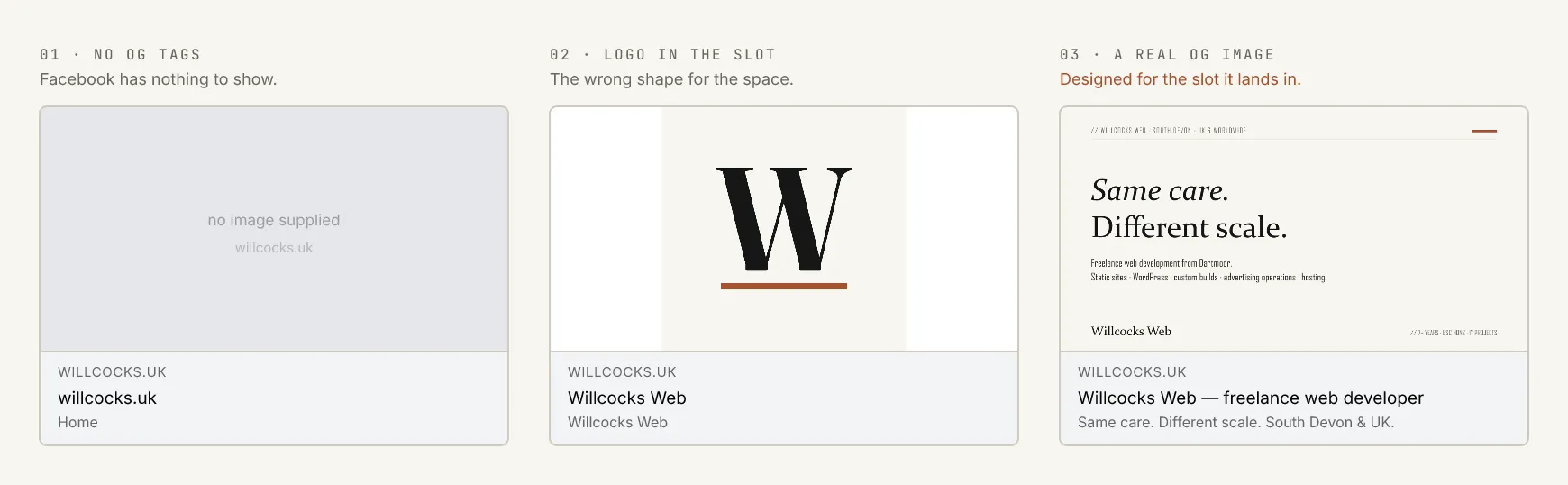
The same URL shared three ways. Both poor examples use this site’s own assets, deliberately. I’m not going to use a real local business to illustrate a mistake.
The middle one is the classic WordPress outcome, and it’s worth understanding why it happens. Most WordPress setups use a post’s featured image as its og:image. That works passably for blog posts. But your homepage usually has no featured image, so the plugin falls back to whatever it can find, very often the logo, which is square or tall, in a slot that’s a wide landscape rectangle. You get a small mark marooned in a sea of white.
Now, why this matters more for a local business than for almost anyone else.
The most valuable thing that can happen to a small business online isn’t ranking well. It’s somebody in a village Facebook group answering “can anyone recommend a plumber?” with your name and your link. That isn’t marketing (nobody paid them, they just had a good experience) and it carries a weight no advertising can buy.
The numbers on this are old but they’ve never really been overturned. Nielsen’s global trust study put personal recommendations at the top by a distance, and, the bit people miss, a brand’s own website second:
Look at the top two bars together, because that’s the whole argument. The most trusted thing is a person vouching for you. The second most trusted is your own website. The share card is the handshake between them: the half-second where the recommendation becomes a click.
Get it wrong and you’ve taken the most valuable thing that can happen to your business and rendered it as a grey box. The fix takes an afternoon, once, forever.
Press Tab
If you’re reading this on a desktop, press the Tab key a few times right now.
You should see a clear outline jump from link to link, moving through the page in the order you’d read it: skip link first, then the navigation, then the content. That’s what somebody using a keyboard, or a screen reader, relies on to get around. On a badly built site the outline vanishes entirely, or leaps to the footer and back, or gets stuck inside a menu that won’t close.
The other half of this is alt text: a short description on every image, which a screen reader announces in place of the picture. It happens to help SEO, because it tells search engines what the image shows. But that’s the wrong reason to do it, and I’d rather say the right one: some of your customers can’t see your photographs, and describing them is the minimum courtesy.
Both of these are skipped for the same reason. In WordPress, alt text is a box you fill in by hand, image by image, and a busy site has hundreds of images. Nobody’s checking. The client will never know.
I build to WCAG 2.2 AA, which is the standard UK public bodies are held to and the one the Equality Act makes it sensible for everyone else to meet. It isn’t an add-on tier on my quotes. It’s just what a finished website is.
Cookie banners, and the ones that are quietly illegal
You’ve seen all three of these:
- “By continuing to browse this site, you accept our use of cookies.” A statement, not a choice.
- A banner with a single OK button.
- No banner at all, with analytics running from the first millisecond.
Under UK law all three are a problem, and the relevant rules are PECR rather than the GDPR everyone quotes. Consent has to be freely given, specific, informed and unambiguous. Implied consent is not consent. Pre-ticked boxes are not consent. Carrying on scrolling is not consent. And crucially, the cookies must not be set until the person has agreed. A banner that appears after the tracking has already fired is decoration.
There’s a recent change worth knowing about, and it’s good news. The Data (Use and Access) Act 2025 amended PECR, and from 5 February 2026 a narrow exemption applies: first-party analytics used solely to produce aggregate statistics about how your site is used, in order to improve it, no longer require consent. If your analytics data is shared with a third party for that third party’s own purposes, the exemption doesn’t apply.
Which means, in practice, that Google Analytics almost certainly still needs consent: Google uses the data for its own purposes, so it isn’t simply working on your behalf. Genuinely first-party, aggregate-only measurement is now consent-free. That’s roughly the setup I already reach for, and why I run two kinds of analytics: an accurate cookieless count that always runs, and Google Analytics behind a real consent gate for the things it’s good at.
The same Act also raised the ceiling for PECR breaches from £500,000 to the GDPR level: up to £17.5 million or 4% of worldwide turnover.
The ICO isn’t about to raid a plumber in Ivybridge over a cookie banner. But it’s the law, it’s the single most trivially checkable thing about your website (anyone can open it and watch what happens before they click anything) and the reason it gets skipped isn’t that it’s hard. It’s that doing it properly takes time, and doing it properly means accepting that some people will say no and your analytics numbers will get smaller and more honest.
The rest of the invisible half
A brisk list, because each of these is a paragraph in its own right and you have things to do:
- Redirects. When a rebuild changes your URLs, every old address needs to point at its new home. Skip it and you throw away years of accumulated ranking overnight. It’s the single biggest own goal in a website rebuild, and it’s entirely avoidable.
- A unique description for every page. Not the same sentence 40 times, and not left blank for Google to improvise from your nav.
- Canonical URLs, so the same page reachable at four different addresses doesn’t compete with itself.
- Width and height on every image, so the page doesn’t jump around while it loads and make you click the wrong thing.
- Self-hosted fonts. Loading fonts from Google’s servers sends every visitor’s IP address to Google, and European courts have already ruled against sites doing it without consent. The fonts on this site are served from this site.
- A
langattribute telling browsers and screen readers what language and region the page is in, the difference between an American and a British voice reading your page aloud. - Email that actually arrives. SPF, DKIM and DMARC records so the messages from your contact form land in the inbox rather than in spam. A contact form that silently fails is worse than no contact form, and almost nobody tests it.
- A 404 page that helps rather than dead-ends.
- A
robots.txtand a sitemap that agree with each other, instead of one inviting search engines in while the other quietly shuts the door.
Where the AI builders stop
I use AI every day and it makes me faster. But this is exactly where the current crop of AI website tools runs out of road, and it’s worth being precise about why.
They’ll get you to about 80%, and I mean that: the output often looks good, and if you judged websites purely on appearance you’d wonder what the rest of us are for.
The problem is the remaining fifth, because it’s made entirely of things you don’t know to ask for. You can’t prompt your way to structured data if you’ve never heard of it. You won’t ask whether the analytics fire before consent, whether your H1 is your logo, whether your area pages are doorway pages under Google’s own policy, whether your share card is a squashed logo, whether the tab order works, or whether your form’s email will land in spam. Those aren’t prompts. They’re a checklist, and the checklist is the job.
That’s what a web developer is for now. Less and less about typing the HTML. That part really has got easier. More and more about knowing what a finished website actually consists of, and doing the unglamorous last fifth that nobody will ever compliment you on.
It’s also why I don’t sell any of this as an upgrade. Every site I build gets the same baseline, whether it’s an £800 static site for a one-person business or a platform with millions of readers. Not out of generosity. It’s what I think the words “a website” mean.
If you’d like to know which of these your current site already gets right, ask. I’ll go through it and tell you what I find, whether or not you ever hire me to fix any of it. It’s a small, fixed piece of work rather than a project: get in touch or email me.
// thanks for reading
If something here was useful, or wrong, I'd like to hear about it. Email Email us.