// 18 August 2026 · by James Willcocks
Four ways to do business email. One of them I won't set up.
Forward it to your personal inbox, use the webmail your host throws in, or pay for Google Workspace or Microsoft 365. Which one you need depends on things nobody explains, and one of the four causes more trouble than it solves. Plus the three DNS records that decide whether the emails you send arrive at all.
- · business
- · seo

Email is the second thing most people sort out after a website, and almost nobody explains the options. You get a domain, someone mentions you can have info@yourbusiness.co.uk, and then you’re on your own.
There are only four ways to do it. They differ enormously in cost, in effort, and in whether the email you send actually arrives. Here are all four, including the one I refuse to set up for clients.
| Cost | Suits | |
|---|---|---|
| Forwarding | Free | A one-person business. Replies go out from your personal address |
| Host webmail | Often £5–£10 a mailbox | Nobody, in my view |
| Google Workspace | ~£5–£12 per person | Most small local businesses |
| Microsoft 365 | ~£5–£12 per person | Teams already in Outlook, and anyone growing |
Option one: forwarding
The cheapest option, and free almost everywhere. Mail sent to info@yourbusiness.co.uk is forwarded straight into the personal inbox you already read, and you carry on using the account you’ve always used.
It takes about two minutes. It’s included in the hosting I provide on static sites. For a lot of one-person businesses it’s enough.
There’s one catch, and it’s worth understanding rather than being frightened of. Forwarding only handles mail coming in. When you reply, it goes out from your personal address, so a customer emails info@ and gets an answer from yourname@gmail.com.
How much does that matter? Less than people tell you, in my experience. Inside an email thread the customer has already started, the reply lands in the conversation they opened, and most people never look at the address at all. I’ve never had a client lose work over it, and I wouldn’t spend money solving it if money is tight.
The published research disagrees with me, and I’ll give you both sides. Surveys consistently find that a domain-based address matters a great deal: 75% of consumers say it’s a key factor in trusting a small business, and around a third say a free email address makes them doubt the business is legitimate. The catch is that almost every one of those studies was commissioned by a company that sells domain names, which isn’t nothing. The truth is probably somewhere between their numbers and my experience.
And there’s a genuine argument the other way that nobody makes, so I will. For a one-person business, a personal-looking address can be an advantage. Emailing a person and getting that person is reassuring in a way that emailing info@ and wondering which of six people will answer is not. A one-person business sells access to its owner, and a generic inbox quietly hides the thing you’re actually selling.
The bit people miss is that free and professional aren’t opposites. There’s a perfectly good middle rung:
dazza_1987@hotmail.co.uk: the address you made at school. Free, and actively working against you.jpplastering@gmail.com: free, obviously a personal account, and yet it reads as a business, because the business name is right there. This is a completely reasonable place for a one-person business to sit.jp@jpplastering.co.uk: your own domain. Best, and about a fiver a month.
The gap between the first and second of those is enormous and costs nothing to close. The gap between the second and third is real but much smaller. If you take one thing from this section: if you’re going to use a free address, put the business name in it and you’ve captured most of the benefit for none of the money.
Where it does start to matter is when the email is the first thing someone sees rather than a reply inside a thread they started. An introduction, a booking confirmation, a price, a follow-up to somebody who is weighing you against two other firms. There, info@yourbusiness.co.uk reads as a business and dave1978@hotmail.co.uk reads as a bloke. Nobody will tell you they noticed. Some of them noticed.
So: forwarding is a real answer, not a bodge, for a one-person business whose enquiries mostly arrive through a website form or a phone call. Once email is how you actually do business day to day, you’ve outgrown it.
Option two: host webmail
This is the one I won’t set up, and I want to explain why properly, because it’s usually the option that costs money.
Most traditional hosting comes with mailboxes and a webmail interface. It’s a real mailbox, so replies do come from the right address. That’s the entire list of advantages.
The interface is genuinely unpleasant. These are the ones that still look like 2009, because they mostly are. No decent search, no useful conversation view, spam filtering that ranges from mediocre to actively harmful, and an experience nobody voluntarily uses twice.
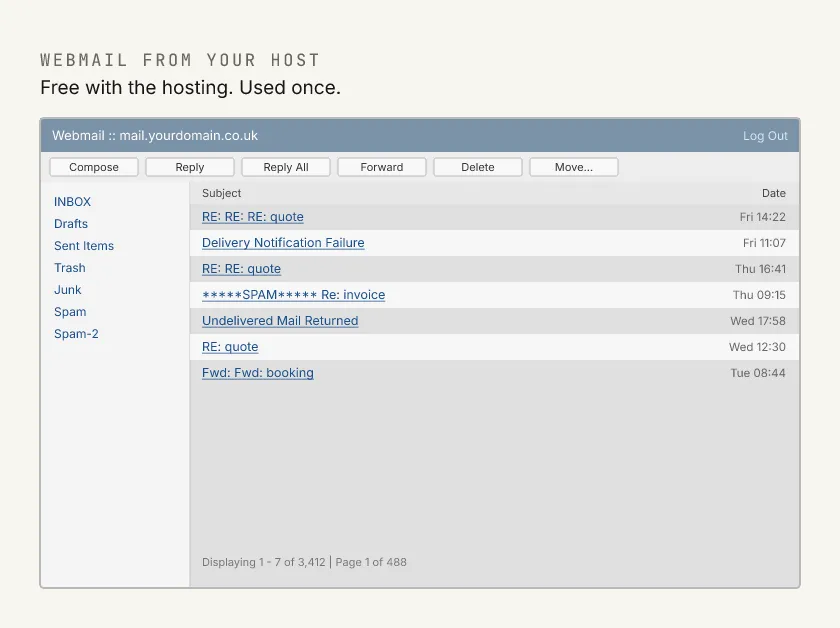
Which means in practice you don’t use the webmail. You connect it to a proper email app instead, and that’s where it gets ugly.
To do that you have to type in a set of technical settings: two server addresses, a couple of port numbers, and a security setting, none of which mean anything to a normal person. Get one wrong and mail silently stops sending. And when you go looking for help, the support page tends to assume you already know what those words mean and where to find them. Now do it again on the laptop, and on both phones, for two people. That’s an afternoon of somebody’s life.
And the escape route just closed. For years the workaround was to let Gmail collect the mail from the host over POP3, so you got a decent inbox on top of a bad mailbox. It was always slow, fetching on a delay of up to fifteen minutes, which is fine until you’re mid-negotiation with someone who thinks you’re ignoring them. In January 2026 Google removed it entirely. POP3 fetching and Gmailify are both gone from Gmail. If that was your setup, it has already stopped working.
A recent client of mine was paying around £20 a month for two webmail mailboxes, plus £40 a year for the domain, with a provider that specialises in selling exactly this to small businesses.
The part that had really beaten them was sending. They couldn’t send email from their phones at all. To reply to anything they had to stop what they were doing, log into the webmail in a browser, and answer from there. The reason turned out to be that sending from a phone or an email app needed something the provider charged extra for, which isn’t a thing anybody outside this trade should be expected to know exists.
Moving both mailboxes to Google Workspace cost them less per month, worked on their phones immediately, and gave them an inbox they were happy to open. The only thing that had stopped them wasn’t knowing it was an option.
That’s why webmail isn’t on my price list. It isn’t that it’s cheap and basic. It’s frequently neither.
Options three and four: a real mailbox
These are the two grown-up answers, and they’re the same idea: a real mailbox that sends and receives as your own business address, hosted by Google or Microsoft, using the interface you already know from Gmail or Outlook.
What you’re actually buying, beyond the address:
- Deliverability. Mail sent from Google’s or Microsoft’s infrastructure is far more likely to arrive than mail sent from a small shared host, because the receiving world already trusts where it came from.
- Spam and phishing filtering that works, backed by more data than any small provider can approach. This matters more every year, and invoice fraud aimed at small businesses is a real, growing problem.
- It works everywhere without setup. Add the account to a phone by typing an address and a password. No ports, no server names.
- Proper search, and it’s on every device. Being able to find the email from that customer in 2023 is worth more than people expect.
- The rest of the suite if you want it, though most small businesses already have Word or Google Docs and never think about it.
Cost is broadly similar between them: expect somewhere around £5 to £12 per user per month depending on tier. Don’t trust any specific figure you read, including mine. Microsoft put its Business Basic and Standard prices up in July 2026, and both companies change them regularly.
Which of the two?
For a typical local business, I recommend Google Workspace, and I say that as somebody who runs Microsoft 365 himself and sets up plenty of it.
The reason isn’t the email. Both are excellent at email. The reason is the administration, and it only shows up on my invoice rather than in a features table.
Microsoft has split its administration across an ever-growing number of separate portals. Security lives in one place, identity in another, the mail settings somewhere else again, and the names change often enough that the guide you find online is usually describing a screen that no longer exists. Setting up two mailboxes and a shared address shouldn’t require knowing which of five admin centres owns the setting you want. When I bill someone for hours, a decent share of those hours are that.
Google keeps almost everything in one console. Adding accounts, aliases, groups and delegation are all a few minutes each, and there’s a built-in tool to copy existing mail across from an old provider, which removes the scariest part of any migration. Gmail itself occasionally believes it’s cleverer than you are, but every one of those features can be switched off.
Where Microsoft wins is scale, and I’d move a growing business over without hesitation. Desktop Office is still the standard your accountant works in, and once you want real device management and security policy across a team, Microsoft is built for it in a way Google is not. Both have a chat tool bolted on and people are entrenched about which is better; I’ve used both for years and wouldn’t try to talk anyone out of the one they’re used to. Plenty of businesses ignore both and use Slack.
The threshold is roughly ten people who each need their own inbox, which isn’t the same as ten employees. Plenty of staff never need one.
The market bears that out, and it flips depending on how you count:
Which is the whole story in one picture. Google is full of one and two person businesses; Microsoft owns anything with staff. Businesses tend to drift toward Microsoft as they grow rather than away from it.
One address, several people
This comes up constantly, because it’s how small businesses actually work. You want info@ to land somewhere both owners can see it, or somewhere a colleague can pick up while whoever normally watches it is away.
There are two ways to do it, and neither is wrong.
The tidy way gives everybody their own account and then shares the one address between them. Microsoft calls this a shared mailbox and the mailbox itself costs nothing, though each person reaching into it needs their own licence. Google does the same job through delegation, which takes about five minutes to set up. Either way you get a record of who replied to what, and removing somebody’s access takes seconds. If the people sharing are staff rather than owners, this is worth the money.
The way plenty of small businesses actually do it is one account, one password, everybody logs in. Nobody in the trade will recommend this to you, and I’m not going to pretend it’s a catastrophe either, because for two owners of a two-person business it mostly just works and the money stays in your pocket.
The one thing to know before you choose it, and then it’s your call: you lose any record of who sent, read or deleted what. Between two owners that matters not at all. The day it involves an employee, it matters quite a lot.
So: two owners sharing a login, fine, I wouldn’t lecture you about it. A shared inbox that staff come and go from, pay for the tidy version.
If you already live in Outlook and like it, stay. It’s a good product and I’ll happily set it up. But if you’re a two to five person business who mostly wants info@ landing on three phones without a fortnight of admin, Google will be less painful for both of us.
Where to buy the domain in the first place
Slightly separate question, but it lands on the same bill and it’s the one people get quietly overcharged on.
Cloudflare is widely considered the best option, and it’s my personal favourite. They sell domains at cost: you pay what the registry charges, with no margin on top. No upsells, and no renewal price that quietly triples in year two. This is where I buy mine.
Its one drawback is that Cloudflare is built for people who do this for a living, and the dashboard shows it. If you’re comfortable in there, it’s the best value going. If you’re not, it’s more rope than you want.
Which is the real reason it usually ends up on my side of the fence. If I host your site, the domain sits inside the £25 a month with everything else: renewal, DNS, the lot, one bill, nothing for you to diarise or remember. That isn’t me holding your domain hostage; it stays yours and I’ll hand it over whenever you ask. It’s one less thing you have to think about, which is the entire point of the arrangement.
The exception is WordPress hosting. If I’m setting somebody up on SiteGround anyway, I’ll usually buy the domain there too, purely so the hosting and the domain arrive on one bill from one company. Slightly more expensive, considerably easier to keep track of, and for a small business reconciling it at year end, one line is worth a couple of pounds.
If you’d rather hold it yourself, 123 Reg is the middle ground I’d point you at. Friendlier than Cloudflare, sensibly priced, and it does the job without fuss.
I’d steer around GoDaddy, though not because it’s dangerous. It’s one of the less aggressive of the big registrars. It’s simply more work than it needs to be: extra steps, billing I find harder to follow, and more upsells between you and the thing you came for. They will sell and set up Microsoft 365 mailboxes, which is genuinely useful if you want one company for everything, but you pay more than going direct for a more limited version.
And two I’d avoid, based on cleaning up after them:
IONOS advertises very cheap domains and hosting, and the advertised price isn’t the price you end up paying. Read carefully what the renewal costs before the introductory year runs out.
Names.co.uk is the worst I deal with. The pattern is the giveaway: charges I wouldn’t have predicted from the advertised price, billing that’s hard to follow, and an exit designed to be inconvenient rather than a click. Cancelling meant getting on the phone. Everything about it is built to keep you rather than to serve you, and that’s a choice somebody made.
That’s the real trap, incidentally, and it isn’t the big names. It’s the small provider selling a domain at £40 a year, mailboxes at a fiver each, and an extra charge for the ability to send email from your phone. A domain should cost about a tenner.
The three records that decide whether any of it arrives
Whichever option you pick, there are three DNS records that determine whether your email reaches inboxes or spam folders. Briefly, and in plain English:
- SPF is a list of who is allowed to send email using your domain name. A receiving server checks the sender against your list.
- DKIM is a cryptographic signature added to each message, proving it genuinely came from you and wasn’t altered along the way.
- DMARC ties the two together and tells receiving servers what to do when a message fails: ignore it, bin it, or quarantine it. It also lets you receive reports on who is sending mail claiming to be you.
That last box is the one people miss. Without DMARC you aren’t telling receiving servers to be strict, you’re telling them nothing at all, and “nothing at all” increasingly gets treated as suspicious.
Two reasons these stopped being optional. First, since 2024 Google and Yahoo have required authentication from senders, and unauthenticated mail is increasingly just dropped. Second, without DMARC anybody can send email that appears to come from your domain, which is precisely how invoice fraud works.
The practical consequence is unglamorous and expensive: the email lands in spam and you never find out. Whatever your business sends (a reply to an enquiry, a booking confirmation, a price, an invoice, a reminder), nobody writes back to say it went astray. It simply goes quiet, and you assume they chose somebody else.
Why pay somebody to do this
The economics are worth spelling out, because they aren’t the same for every part of this.
Adding SPF, DKIM and DMARC correctly takes me about half an hour. It takes somebody doing it for the first time most of a day. The hard part isn’t the records themselves: it’s knowing where they go, how your particular provider’s DNS panel is laid out, that you can’t have two SPF records and must merge them instead, and how to check afterwards that it actually worked. Half an hour against a day isn’t a close call, and the cost of getting it wrong is email that quietly doesn’t arrive.
Setting up Google Workspace or Microsoft 365 properly takes me longer, often an evening, and I do it in an evening deliberately so that nothing is in flight while the mail is moving over.
But the real argument isn’t the hours. It’s that this is the sort of job you should only have to think about once. My whole approach to the technical side of a business is that you should rarely need to contact me at all: it works, it stays working, and when something does break there’s somebody to email rather than a day of research ahead of you.
That’s also how I bill it. There’s no retainer and no monthly fee for being available. If your site is with me the hosting is a flat £25 a month, with up to an hour of changes a month included, and that’s the whole bill; in a month where you don’t need me, you pay me nothing beyond it. I’d rather not charge you for work I’m not doing. When you do need something, I’m there.
You’re good at your trade. This is mine.
The short version, if you skipped: forwarding is a legitimate free option for a one-person business. Webmail from your host is usually a false economy. Google Workspace suits most small local businesses, Microsoft 365 suits you as you grow. And whichever you choose, get SPF, DKIM and DMARC right, because an email that doesn’t arrive costs you the work without ever telling you it happened.
If you’d like this sorted rather than researched, that’s a small fixed piece of work and I’ll tell you what you need before you spend anything. Email me. It arrives, obviously.
// thanks for reading
If something here was useful, or wrong, I'd like to hear about it. Email Email us.